▦ ICOForge ON YOUR DEVICE
SMALL FILE. EVERY DETAIL.

JPG to ICO.

↳ Your files stay in your browser.
Not a byte is uploaded to any server.

01 / SOURCEJPG FIRST · FILES STAY LOCAL
02 / SIZES INSIDE YOUR ICO
Icon sizes in pixels

One multi-size ICO per image. Single sizes available too.

03 / YOUR ICONS

Ready for the small screen.

00

A little image.
A proper icon.

Your previews will appear here.
LOOK AT THE PIXELS, NOT JUST THE EXTENSION

What changes when a JPG becomes an ICO?

The file becomes an icon container with one PNG-encoded frame for each selected size. A white background already baked into your JPG stays white. This converter does not remove backgrounds, sharpen a blurry logo or invent missing detail. Choose transparent padding to keep the original proportions, or deliberately stretch the picture to fill the square.

Need a genuinely transparent logo? Start with a transparent PNG on the PNG to ICO tool. Need to inspect an existing icon? Extract its individual PNG frames.

01 / REPRODUCE IT

One rectangle. Two honest outcomes.

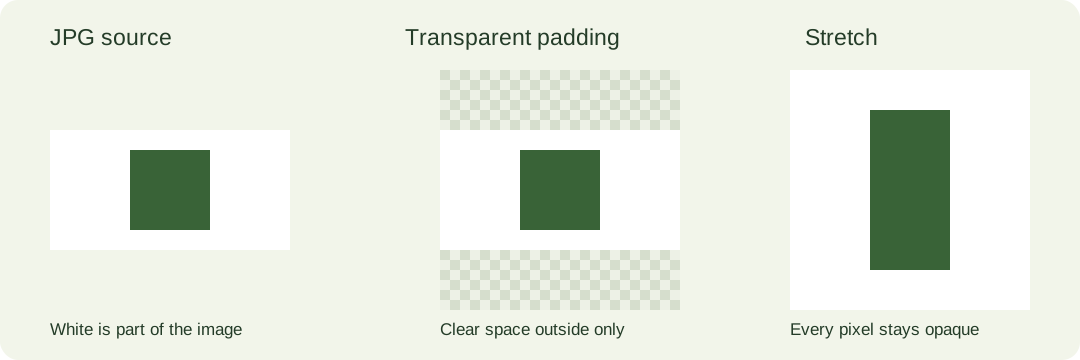
Our downloadable test image is a 120 × 60 JPEG with a green square on a white background. Select only 64 pixels in the converter above. With transparent padding, the picture occupies a centered 64 × 32 strip. The empty area above and below is transparent; the white pixels inside that strip remain opaque. With stretch, the source fills 64 × 64 and the green square becomes taller. Neither option crops the left or right edge.

Download the exact rectangular JPG · Download the square control JPG

The square control separates a file-format question from a shape question: a square source needs no added border in either mode. You can convert both files together and compare their individual downloads. These are original generated test images, not customer artwork.

02 / CHECK THE RESULT

Padding is not background removal.

Open the generated icon with our ICO to PNG inspector and download the 64-pixel frame. In the rectangular padding test, there are 2,048 transparent pixels and 2,048 opaque pixels. Pixel (0, 0) is transparent, while pixel (0, 24), inside the white image background, remains opaque. In the stretch test, all 4,096 pixels are opaque. These are checks of our published sample and conversion path, not a promise about every image or browser.

Coordinates start at the top-left corner with zero. Alpha zero means transparent; alpha 255 means opaque. Count pixels in the extracted PNG, rather than judging a white preview background. A checkerboard is a viewing aid; it is not artwork that gets added to the file.

A rectangular JPEG keeps white pixels inside the image; transparent padding only adds empty space outside it.
Same source, different shape treatment. White inside the JPG stays white in both outputs.
03 / MAKE THE COMPARISON FAIR

Change one setting at a time.

Keep the source file and selected output size identical when comparing modes. First convert the rectangular fixture with transparent padding and download its multi-size ICO. Then switch to stretch; changing that setting regenerates the result. Save the second file with a different name so your download folder does not hide which mode produced which icon.

Next convert the square control without changing the size. If that image has an unexpected border, inspect the source itself for a border already present in the JPEG. Converting the container cannot distinguish a deliberate white margin from an unwanted background.

For your own photo, compare the small output at its intended size. A rectangular photo compressed into a tiny icon can lose recognizable details even when the conversion is correct. Choosing a clearer source is different from cropping it automatically; this tool does not crop.

04 / SUPPORTED HERE

Files and limits, stated plainly.

JPG and JPEG are the main inputs on this page; PNG, WebP and self-contained SVG are also accepted by the shared browser converter. Select up to 30 files, at most 20 MB each and 40 million decoded pixels per image. Output sizes are 16, 24, 32, 48, 64, 96, 128 and 256 pixels. The default is 16, 32 and 48.

Download a multi-size ICO per source, one selected size, or a ZIP containing the generated icons. PNG-encoded ICO entries target Windows Vista and later; older software may need a different encoding. Browser memory and download behavior can impose additional limits. No account or server conversion is used.

JPG TO ICO QUESTIONS

The details that affect your icon.

Does converting JPG to ICO remove the white background?

No. This tool preserves the JPG pixels. Transparent padding only adds empty space around a non-square image. Use the included rectangular fixture to see the difference.

Will my picture be cropped?

No. Transparent padding keeps its proportions and all its edges. Stretch fills the square by changing proportions. The converter does not offer automatic cropping.

Are JPG and JPEG different inputs here?

Both filename extensions are accepted. Choose the file directly; renaming it to .ico is not conversion. The tool builds a real ICO directory and image frames.

Can I convert several JPG files without uploading them?

Yes. Select multiple files or drop them into the input. Conversion and ZIP packaging run in your browser. Closing or reloading the page clears the in-memory results.

Which size should I download?

Select the dimensions your destination requires. Multi-size ICO is useful when the destination chooses between several frames. The single-size download is available when you need exactly one frame.

Format reference: MDN image formats. The downloadable fixtures and pixel checks above document this tool’s own behavior.