ICO to PNG.
Your icon stays in your browser.
No file upload. No sign-up.
Choose an icon to see its frames and download PNG images.
Get the image that is actually inside your icon.
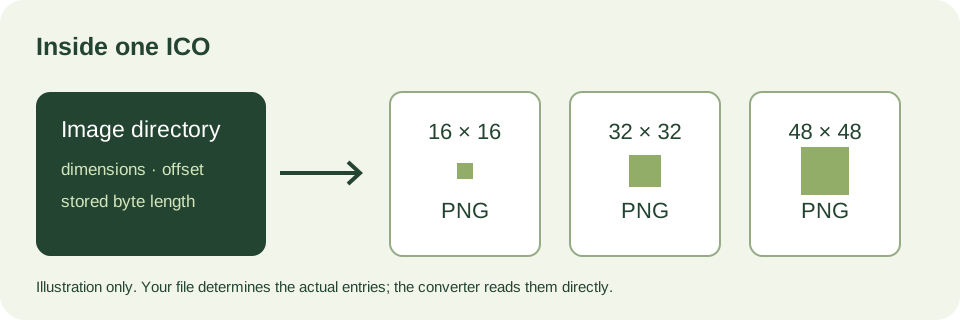
An ICO can contain several images. This tool reads its directory and gives each frame its own download. It does not enlarge a small icon to invent a larger original. The card shows the stored dimensions, the extracted PNG size and the frame's encoding.
What is checked before a download appears?
- The directory must fit inside the file.
- Each frame's byte range must stay inside that file and outside its directory.
- The decoded image dimensions must match the directory entry.
- Each successful output receives its own SHA-256 fingerprint in “Inspect this frame”.
A rejected frame remains visible with a reason. Other valid frames can still be downloaded. These checks detect specific structural problems; they are not an antivirus scan or a guarantee about every possible ICO file.
Original PNG bytes or a new PNG?
If an entry already contains PNG data, its original image bytes are downloaded directly. If an entry contains a legacy DIB image, your browser decodes that frame and Canvas writes a PNG. That second path changes the encoding. We do not claim byte-for-byte preservation for it. A browser that cannot decode a legacy frame will show an error instead of a fabricated result.
A reproducible example, included with this page.
Use “Try our sample icon” to inspect the same site-owned file used by the homepage. The live cards report its actual contents. Download a frame, run a SHA-256 utility on the PNG and compare it with the fingerprint in that frame's details. For a PNG-encoded entry, compare the output with the byte slice at the displayed offset and length: those bytes should match exactly.
Three small files. Three different outcomes.
These are ICOForge's own reproducible fixtures, derived from our public sample icon. They contain no customer artwork. Download one, select it in the tool above and compare the status with the expected outcome below. The files intentionally exercise different directory checks, so do not install the two malformed fixtures as your website's icon.
- Valid sample: every directory entry should produce one PNG download. Each card's declared dimensions must agree with the decoded image.
- Out-of-bounds first entry: the first frame points past the end of the file. Its card should report a byte-range error and provide no download; the remaining valid entries should still work.
- Mismatched first entry: the first entry's width is deliberately changed without resizing its image data. Its card should state the declared and decoded dimensions and withhold that download.
A failure that names the bad frame is more useful than a blank result. For your own icon, keep the original unchanged, compare its reported dimensions and byte length, and use a separate copy if you need to repair the source. The displayed fingerprint describes the exact PNG prepared for download, not the ICO as a whole. Two frames with identical dimensions can still contain different pixels; compare their PNG fingerprints instead of assuming they are duplicates.
How to convert ICO to PNG
- Choose one
.icofile, or use our sample. - Read the frame dimensions and choose the resolution you need.
- Download that frame as PNG. Repeat for other frames if needed.
Questions, answered.
Why do I see more than one image?
Each card represents one directory entry in your ICO. A multi-resolution icon stores separate images so software can choose a suitable size.
Will a 16-pixel icon become a sharp 256-pixel PNG?
No. This page extracts existing frames without resizing them. If your ICO contains only a 16-pixel frame, that is the original resolution available here.
Why was one frame refused?
Read its error. An invalid byte range, mismatched dimensions or an unsupported browser decoder can prevent that frame from being exported. Do not treat a successful export of another frame as proof the whole source is structurally valid.
Can I upload CUR, EXE or DLL files?
No. This tool accepts standalone ICO containers only. It does not extract executable resources or cursor files.
Does the sample button upload my file?
No. It downloads ICOForge's public /favicon.ico sample. Your selected file is read locally and is never included in that request.
Limits and privacy
One ICO per selection, up to 20 MB and at most 256 directory entries. Directory dimensions are limited to the ICO byte fields, with zero representing 256 pixels. Downloads are prepared locally; your browser controls where they are saved. Reloading clears the current results. No account or conversion history is created.
Need the other direction? Use our PNG to ICO converter.